For you or your whole team · 3 months · Qualiopi certified
AI is already in Word, Excel, PowerPoint, Outlook and Teams. Now you need to know how to use it: 5 hrs of video, 2 live workshops and a group for your questions, over three months.
Tuesday, November 10, 12:30 · 60 min · online · free


“We are making Copilot a new operating system for work.”

Satya Nadella
CEO of Microsoft, September 2026
 Word
 Excel
 PowerPoint
 Outlook
 Teams
 OneNote
 OneDrive
 SharePoint
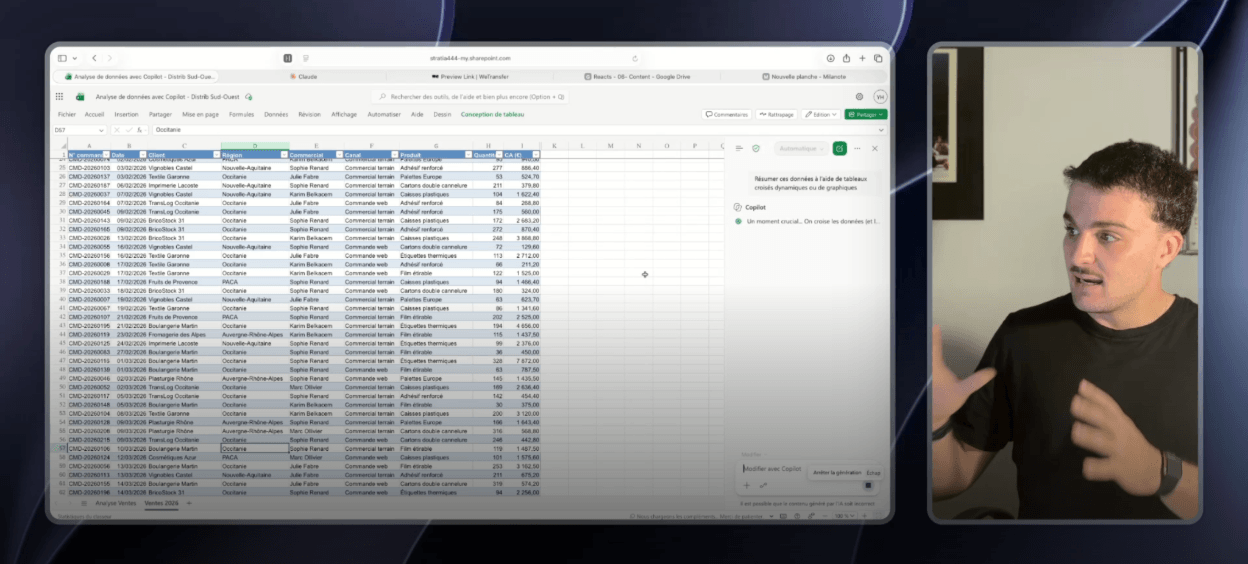
An introduction to understand AI more broadly, then a module on Copilot, and one module per tool: Word, Excel, PowerPoint, Outlook, Teams and OneDrive. Short videos, available any time for 3 months, on computer or phone.
Two one-hour group workshops to ask your questions and discover extra features. They take place every two weeks, around the 15th and 30th of the month. Whatever day you sign up, you join the next two workshops.
For 3 months, so you never get stuck. Copilot's new features are posted there as they come out.

Analyse your figures, produce a presentation, write a full document, on your own, without going through a colleague.
The decision made four months ago, a supplier's file, the point raised in a meeting you missed. One question is enough.
Minutes saved fifty times a day, right inside the tool you already work in.
You know what Copilot can do in each app, and new features are shared with you as they come out.
Analyse a sales spreadsheet or an export from your ERP by asking a simple question.
Write an entire document from a few notes or scattered information.
Create a complete presentation from meeting notes or a Word document.
Summarise a long email thread and draft the reply, in your own tone.
Get the meeting notes and everyone's action items as soon as the meeting ends.
Find any file by describing what's in it, without knowing its name.
Nothing to install. No new tool, no new habit to form. Copilot is built into Word, Excel, PowerPoint, Outlook and Teams.
Already paid for. A company paying for Copilot licences without training its teams is paying for a tool it only half uses. The Accelerator is what makes an existing subscription pay off.

The live workshops
The workshops are run live by Yoan Hibert, AI expert at StratIA. You bring your questions and your files, he shows you how Copilot handles them, right in front of you, and you discover features the videos don't cover yet.
Two one-hour workshops, around the 15th and 30th of the month.
What it looks like in the field
9
AI agents created in one day
One day on Copilot, built around their real files. Each participant left with their own AI agent, for example to speed up reading the technical proposals they receive.
€250 excl. VAT
€300 incl. VAT
5 hrs of video, 2 live workshops, a Q&A group, for 3 months.
Join the Accelerator€2,000 excl. VAT
OPCO-fundable
The same content for 10 people, at a reduced rate.
Contact us€3,200 excl. VAT
OPCO-fundable
The same content for 25 people, at a reduced rate.
Contact usOne single group for everyone, individuals and companies alike.
The quality certification was issued for the following category of activity: training activities.
StratIA is Qualiopi certified (QUA009710). Your training can be paid for by your company, from its training budget or through its OPCO.
Get the kit for my employerYour company can pay for the Accelerator. We give you a kit to request it: an email to send to your manager, the programme and a quote in the company's name.
For a team, your company can have all or part of the training covered by its OPCO, depending on its sector and size.
Programme, training agreement, attendance sheets, certificates: we provide everything. You don't have to look for anything.
30 minutes to understand your needs and point you to the right training. No commitment.
No. The Accelerator is for anyone who works on Microsoft 365. The features available depend on your licence: we show you what you can already do with yours, and what the Microsoft 365 Copilot licence adds if you decide to get it.
You watch 5 hrs of short videos at your own pace, on computer or phone. You take part in two one-hour live workshops. And for three months, you have access to a group to ask your questions, where Copilot's new features are shared as they come out.
Allow 5 hrs of video and 2 hrs of workshops, spread however you like over three months. The real work is applying what you see in your daily routine, and that's where you save time.
Every two weeks, around the 15th and 30th of the month, excluding weekends. Whatever day you sign up, you join the next two workshops. They're run by Yoan Hibert, AI expert at StratIA: you bring your questions and your files, he shows you how Copilot handles them.
Yes. The course starts with an introduction to understand AI broadly, before moving on to Copilot, then to each app: Word, Excel, PowerPoint, Outlook, Teams and OneDrive. No technical skills required.
You post your question in the group, at any time during the three months. The live workshops are there for that too: you come with your case, we work through it in front of you.
Yes. We give you a kit to request it: an email to send to your manager, the programme and a quote in the company's name. StratIA is Qualiopi certified (QUA009710), so the training can be paid for from your company's training budget.
Two business packs: €2,000 excl. VAT for 10 people, €3,200 excl. VAT for 25. Your staff get the same content, a dedicated Teams space for their questions, and a private workshop on top of the group workshops (1 hr for 10 people, 2 hrs for 25). The packs are fundable by your OPCO.
The Accelerator helps one person progress on Copilot, online and at their own pace. The Bootcamp trains a team together, in one day, on your own files and with the tool of your choice (Copilot, Claude, Gemini or ChatGPT), all the way to building your first agents. To train a whole team on Copilot, see our in-company Copilot training.
You book a short call with our team. We check that the Accelerator fits your needs, then send you your access and the dates of your two workshops. Want to see what it looks like first? Join the next free masterclass.